
Documentation › Datasets
dbt integration
Sync your dbt project's models, descriptions and metrics into Embiro BI datasets, from dbt Cloud, an uploaded manifest.json or a URL.
If your team models its data with dbt, Embiro BI can read your project and keep your datasets in step with it:
- every model becomes a dataset on the database connection dbt builds into;
- model and column descriptions from your dbt docs are copied onto the datasets;
- dbt metrics become dataset metrics, so charts compute them exactly as dbt defines them.
Who can do this: Super Admin and Admins. It is a plan feature ("dbt integration"), included in Enterprise and in free trials.
How it works
dbt writes a file called manifest.json every time it runs. It describes every model, column, test and metric in the project. Embiro BI reads that file. It never runs dbt itself and never changes your database.
1. Choose the connection
Open Settings → dbt.
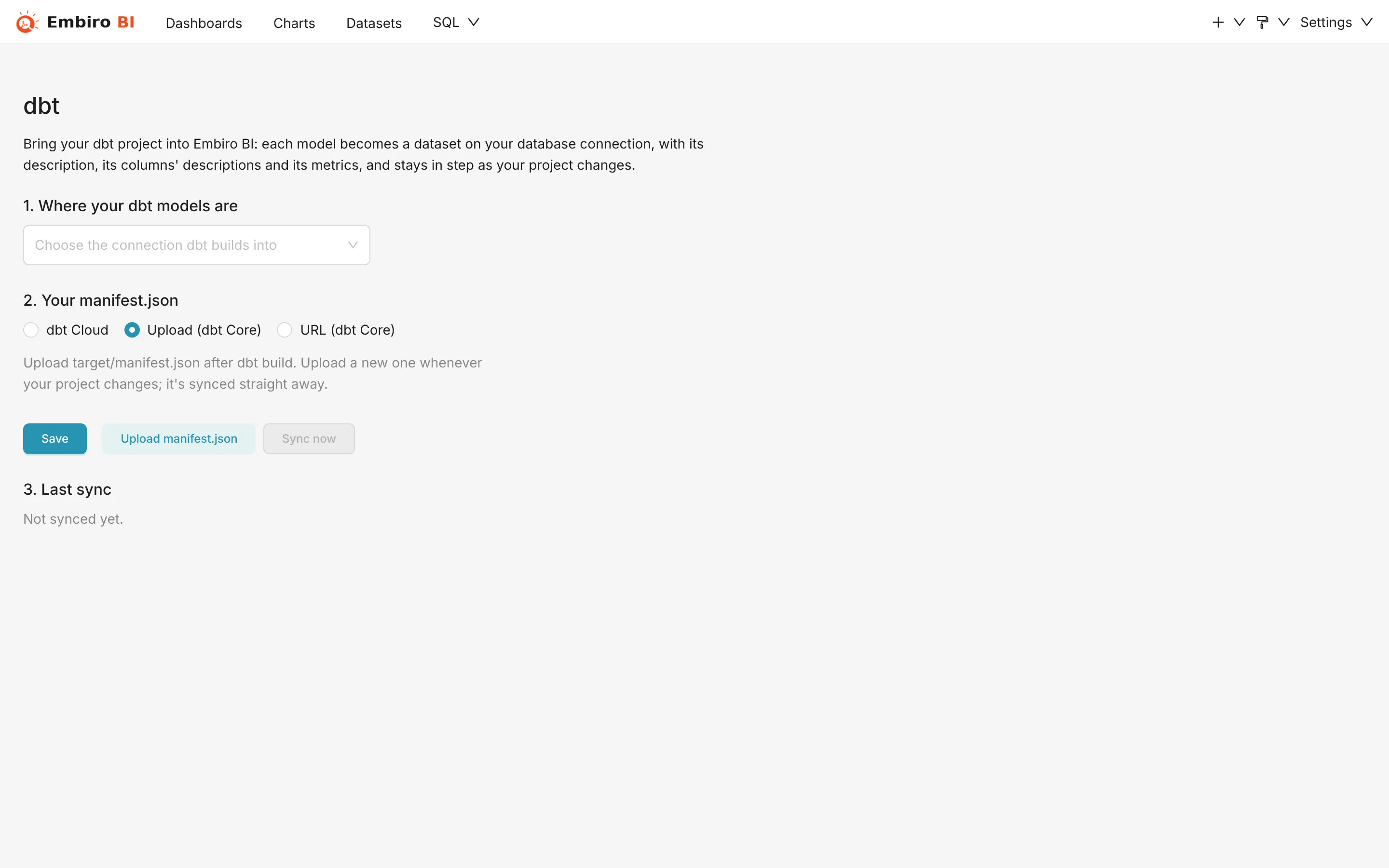
Under 1. Where your dbt models are, choose the Database connection that dbt builds into: the same database and login your dbt profiles.yml targets. Connect it first if you haven't.
2. Give Embiro BI your manifest.json
Under 2. Your manifest.json, pick where it comes from:
dbt Cloud
Embiro BI fetches the manifest of your job's latest successful run.
- In dbt Cloud, open the job that builds your production models (Deploy → Jobs). Its URL contains both IDs:
https://cloud.getdbt.com/deploy/<account ID>/projects/<project>/jobs/<job ID>. - Create a token: Account settings → Service tokens → + Create service token, with the permission Read-only (or Job Viewer). Copy it.
- In Embiro BI, fill in:
- Address:
https://cloud.getdbt.com, or your region's address such ashttps://emea.dbt.com; - Account ID and Job ID;
- API token.
- Address:
- Click Save.
The token is stored encrypted and only ever sent to dbt's own servers. After saving, the field shows Saved. Enter a new one to replace it.
Upload (dbt Core)
Run dbt, then upload the file:
dbt build        # or: dbt run && dbt docs generate
# the file is target/manifest.json
Click Upload manifest.json and choose target/manifest.json. Repeat after changes to your project. Files up to 100 MB are accepted.
URL (dbt Core)
If your CI publishes manifest.json somewhere, such as a storage bucket or a docs site, enter its https:// address. Embiro BI downloads it at every sync. The address must be public, or carry its own access signature (for example a pre-signed link).
3. Sync
- Click Sync now to sync straight away.
- Tick Sync every day to sync automatically every night (02:40 UTC, 05:40 in Kampala).
3. Last sync shows what happened:
- Datasets created
- New datasets for models seen for the first time, and existing ones updated.
- Not in the database yet (run dbt to build them)
- Models in the manifest whose table doesn't exist yet. Run dbt, then sync again.
- No longer in dbt (the datasets were kept)
- Models removed from your project. Their datasets are never deleted automatically, so charts on them keep working until you decide.
- Metrics not synced
- dbt metrics Embiro BI can't translate, with the reason (see below).
What gets synced
| dbt | Embiro BI |
|---|---|
| Model (table, view, incremental) | Physical dataset on the chosen connection. Ephemeral models are skipped, because they have no table. |
| Model description | Dataset description |
| Column description | Column description (tooltip in the chart editor) |
| Simple, ratio and derived metrics (MetricFlow, dbt 1.6+) | Dataset metrics, including their filters on the model's own dimensions |
| Legacy metrics (dbt before 1.6) | Dataset metrics |
Metrics synced from dbt are marked as coming from dbt and are updated on each sync. Metrics you add yourself in Embiro BI are never touched.
Not translated (listed under Metrics not synced): cumulative and conversion metrics, metrics with an offset window, percentiles, and filters on another model's dimensions. Recreate those by hand as custom metrics if you need them.
Troubleshooting
- "The last sync failed (401)"
- The dbt Cloud token is wrong, expired or lacks read access. Create a new service token and save it.
- "The last sync failed (404)"
- Check the account ID and job ID, and that the job has had at least one successful run.
- Every model is "Not in the database yet"
- The chosen connection points at another database or schema than dbt builds into. Compare it with your dbt target.
Something unclear or missing? Tell us and we'll improve this page.